
Most STR operators have figured out their summer pricing. They know winter is slow and price accordingly. The part that costs them money every year is the six to eight weeks in between: shoulder season.
Shoulder season pricing short term rental is not just a weaker version of high season. It behaves differently, it requires different settings in your pricing tool, and it punishes operators who treat it like either of the seasons surrounding it. After managing pricing across 4,000+ properties and $200 million in annual bookings, shoulder season is where I consistently see the largest gap between what operators are earning and what they could be earning.

Here is the full framework we use, including how to define your seasons, how to set up PriceLabs for shoulder season, and the specific day-of-week adjustments that make the biggest difference.
Key Takeaways
- Shoulder season is defined by occupancy between 50% and 70%, with a much larger weekday-weekend gap than either low or high season
- Low season is about filling units. High season is about maximizing ADR. Shoulder season requires doing both at the same time for different days of the week
- Custom seasonal profiles in PriceLabs let you apply different minimum stay rules, day-of-week adjustments, and pricing logic to shoulder season dates only
- Forcing longer minimum stays during shoulder season almost always costs revenue because cheaper weekdays bring guests in voluntarily
- The biggest mistake operators make is using the same settings year-round and wondering why their fall occupancy numbers are soft
The Four-Season Framework
Before you can price shoulder season correctly, you need a clear definition of where it starts and ends. Most operators think about seasons loosely without defining the precise weeks that fall into each category. That vagueness leads to inconsistent pricing settings and missed revenue.
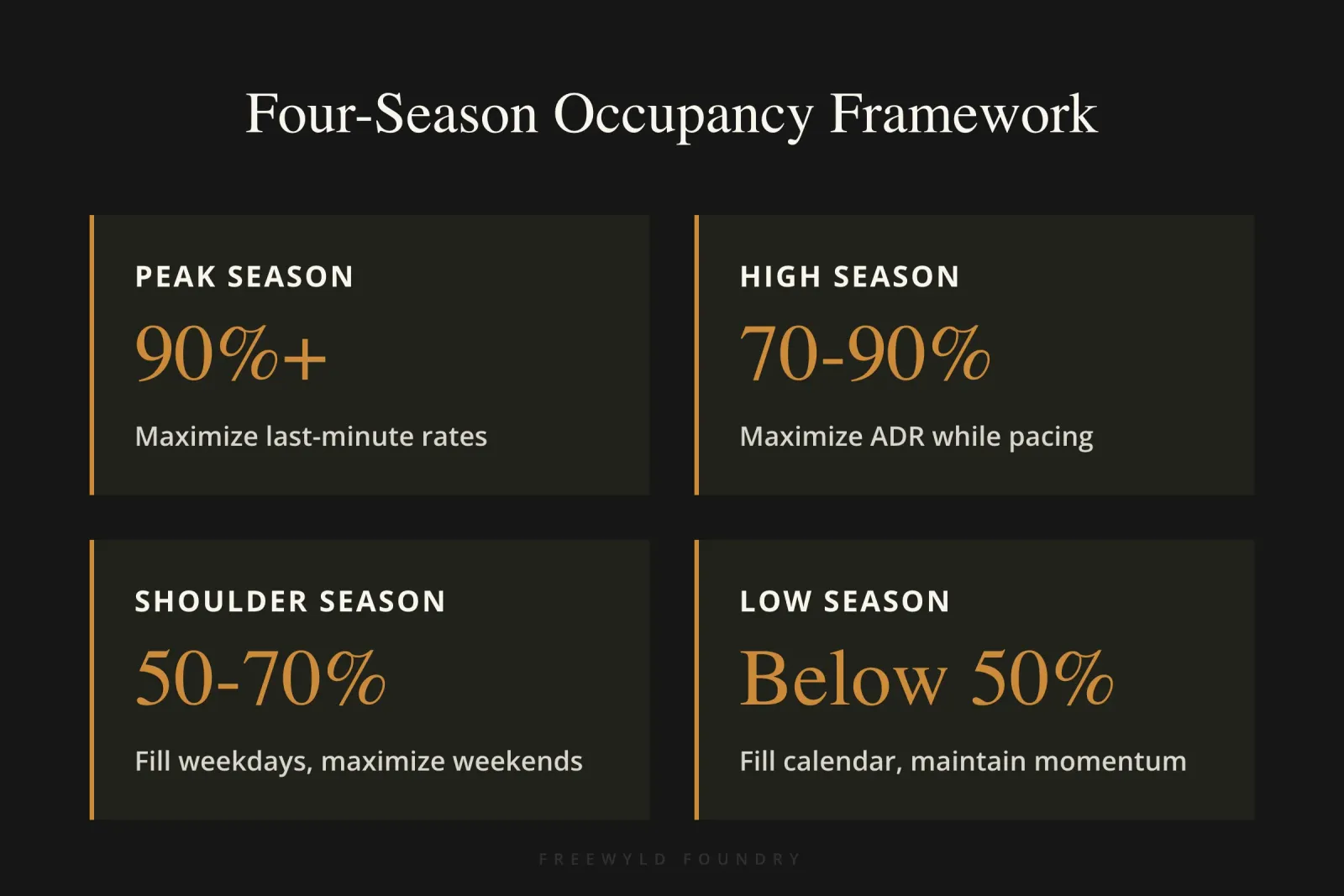
We define seasons using one primary signal: occupancy. Here is the framework:
Peak season: Occupancy consistently above 90%. The market is selling out. This is where last-minute prices can hold high because there is not much inventory left. Airlines use this principle constantly: fewer seats available means higher prices for whoever is still shopping.
High season: Occupancy between 70% and 90%. Strong demand, but not at a full sell-out level. The strategy is maximizing ADR while pacing ahead of the market.
Shoulder season: Occupancy between 50% and 70%. This is the tricky zone where weekends often behave like high season while weekdays drop toward low season. The gap between a Friday and a Tuesday can be enormous.
Low season: Occupancy below 50%. The primary goal shifts to filling your calendar. Getting bookings, maintaining OTA momentum, and keeping your listing visible matters more than squeezing ADR.
These thresholds are guidelines, not hard rules. If your shoulder season is technically hitting 52% on one particular Tuesday, do not redesign your strategy around that outlier. Apply the framework to the overall pattern.
How to Define Your Seasons by Reading Your Occupancy Graph
The best tool for identifying where shoulder season falls in your specific market is the future occupancy graph inside your market dashboard. This shows you current occupancy on the books for the next 12 months alongside last year’s final occupancy numbers.
Using the Smoky Mountains as an example, one of the most popular vacation rental markets in the US, here is what the pattern looks like:
July and August show peak and high season occupancy, with weekends above 90% and even weekdays running strong. Then comes the second week of August, when schools go back in most markets. That is the exact moment you start to see weekday occupancy drift down week over week. The market has entered shoulder season.
From mid-August through most of September and into early October, the weekends can still hit 70-75% occupancy. But the weekdays drop below 50%. On average across the week, you are squarely in that 50-70% shoulder zone.
The Smokies then see a spike in early-to-mid October when schools take fall breaks, occupancy returns to high season levels for those specific weeks. Then it drops back to shoulder season territory in November, with a narrow peak around Thanksgiving weekend, before the Christmas holiday period.
This pattern is useful for two reasons. First, it shows you that shoulder season is not a single block, it comes in multiple windows throughout the fall. Second, it illustrates the core challenge: the weekday-weekend gap is wide and variable. That gap is what makes standard pricing tool settings insufficient.
Why Your Standard Pricing Tool Settings Are Not Enough
Dynamic pricing tools like PriceLabs account for seasonality. That is a core part of what they do. So why do you need to configure anything manually?
The problem is that pricing tools apply seasonality adjustments broadly, without knowing how your specific portfolio is pacing relative to the market. During low season, the tool often prices units slightly too high, it underestimates how much you need to compete for scarce bookings. During high season, it often prices slightly too low, it does not fully capture how elevated ADR can get when the market is near capacity.
In shoulder season, both problems show up simultaneously, but on different days of the week. Your weekdays need pricing logic closer to low season (competitive, fill-focused). Your weekends need pricing logic closer to high season (ADR-focused, pacing-aware). A single pricing profile cannot do both.
Custom seasonal profiles solve this. They let you apply different settings including minimum prices, base prices, day-of-week adjustments, minimum night stay rules, check-in and checkout restrictions to specific date ranges only, without changing anything else in your account.
Setting Up PriceLabs Seasonal Profiles for Shoulder Season
Inside PriceLabs, go to Customizations and look for the Custom Seasonal Profile section. Click Apply, then Edit Profile.
Percentage vs. fixed pricing: For most portfolios, percentage-based adjustments are the right choice. Instead of setting a fixed minimum price of $200 for every unit, a percentage adjustment applies a multiplier to whatever minimum you have already set for each listing. This means a three-bedroom cabin with a $350 minimum and a studio with a $120 minimum both get treated proportionally. Fixed pricing only makes sense if you have a very small number of units that are each unique and you want granular control over every setting.
Setting date ranges: Create separate shoulder season blocks for each distinct window. Using the Smoky Mountains example again, you might build:
- Shoulder Season 1: Mid-August through early September (cut out Labor Day weekend, which behaves like high season)
- Shoulder Season 2: Mid-September through late September
- Shoulder Season 3: Early November through mid-November
- Shoulder Season 4: Early December (pre-Christmas period with heavy weekday-weekend swings)
Each of these gets its own profile with appropriate settings for that particular window.
What you can customize in each profile: As of the current version of PriceLabs, you can adjust minimum price, base price, maximum price, minimum night stay profile, check-in and checkout profile, and a full custom pricing profile that includes any of PriceLabs’ standard settings: last-minute discounts, occupancy-based adjustments, orphan day pricing, and day-of-week multipliers.
Day-of-Week Pricing: The Most Important Shoulder Season Adjustment
The weekday-weekend gap is the defining feature of shoulder season pricing short term rental strategies, and day-of-week multipliers are the most direct tool for addressing it.
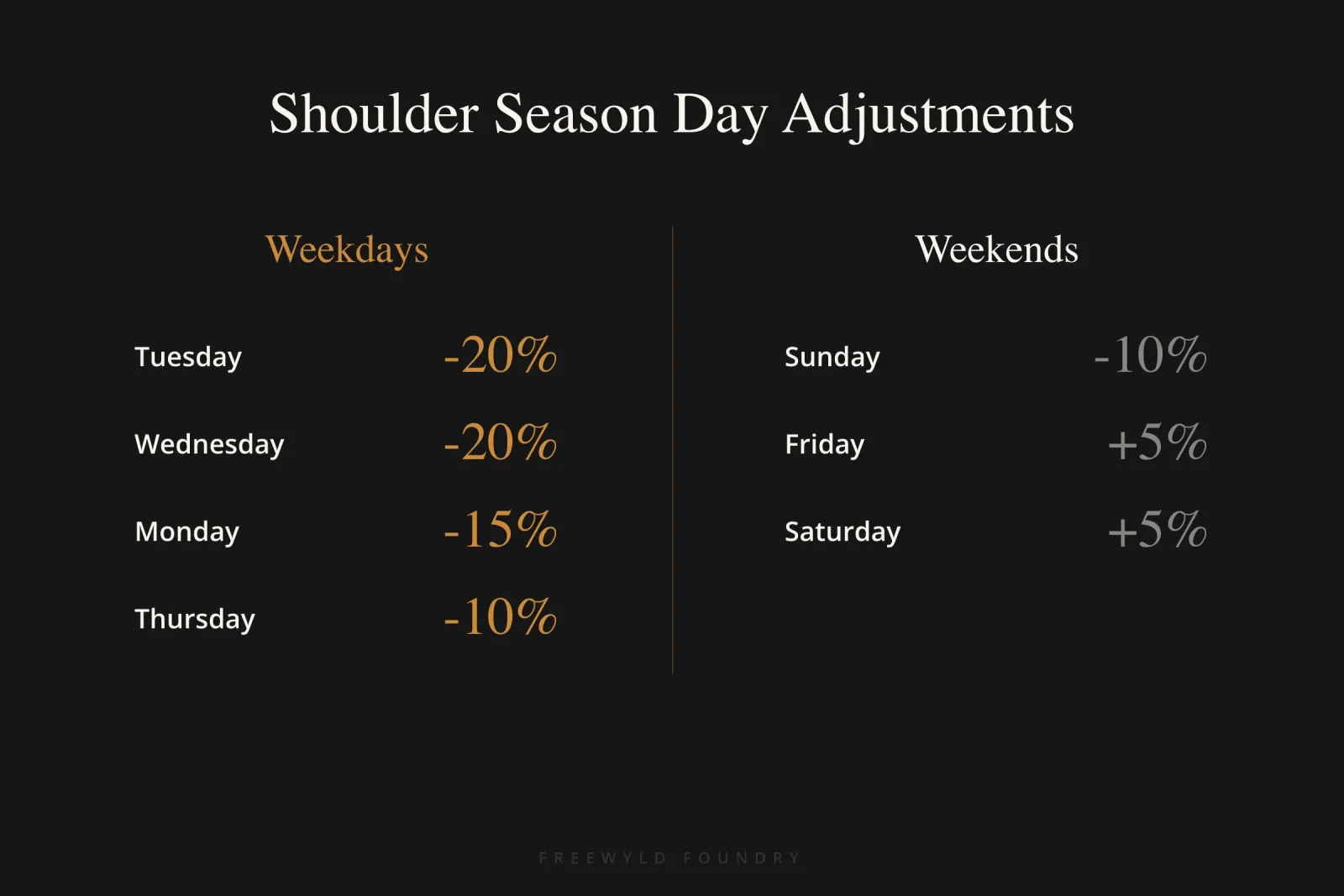
Here is a typical setup for a shoulder season profile:
| Day | Adjustment |
|---|---|
| Tuesday | -20% |
| Wednesday | -20% |
| Monday | -15% |
| Thursday | -10% |
| Sunday | -10% |
| Friday | +5% |
| Saturday | +5% |
The exact percentages depend on your market and your portfolio. Some markets have stronger Thursday demand than others. Some see Sunday nearly as strong as Saturday. Use last year’s occupancy data broken down by day of week to calibrate your specific numbers.
The logic behind pricing weekdays significantly cheaper is twofold. First, cheaper weekdays get filled. Second, and this is often overlooked, a low Thursday or Sunday price will cause some guests to voluntarily add a night to their weekend stay. If Friday and Saturday are priced at $500 and Thursday is $180, a guest who was planning to arrive Friday morning will sometimes book the Thursday instead so they can check in the night before. You capture that extra night without forcing anyone to take it.
The Minimum Stay Trap
One of the most common shoulder season mistakes is trying to solve the weekday occupancy problem by requiring longer minimum stays on weekends. The reasoning sounds logical: “If I require a four-night stay, guests have to book into the weekdays.”
The problem is that most demand in shoulder season is for short stays, two to three nights, typically Friday through Sunday or Thursday through Sunday. When you require four nights on a weekend, you are not converting more guests into longer stays. You are removing yourself from the search results for everyone looking for a shorter stay. That is most of the market.
The math usually works against forced longer minimums in shoulder season. A two-night Friday-Saturday booking at a strong ADR, with the weekday nights sitting empty, often earns more than a forced four-night booking at a rate low enough to get someone to commit to a mid-week arrival.
There are exceptions. On peak demand weekends like Labor Day, Thanksgiving, New Year’s, or major local events, longer minimums far in advance can make sense. But those weekends should already be excluded from your shoulder season profile and treated as their own mini-season.
For standard shoulder season weekends, the better play is: allow the two-night stay, price the weekdays aggressively, and let price do the work of attracting the extra nights.
Check-In and Checkout Restrictions
Shoulder season is also a good time to review your check-in and checkout restrictions. PriceLabs lets you configure these by season, which means you can block check-ins or checkouts on specific days during specific windows without affecting your high season settings.
Common applications:
- Block check-ins or checkouts on Thanksgiving Day itself to avoid splitting the holiday weekend and forcing a turnaround on a day your cleaning team does not want to work
- Block Christmas Day check-ins or checkouts for the same reason
- Block July 4th in markets where the holiday generates significant demand, you do not want a checkout on the morning of a holiday that could otherwise be a full revenue night
In shoulder season specifically, some operators find it useful to block Monday checkouts during lighter weeks to consolidate turnovers. Whether this makes sense depends entirely on your operational setup and how it affects your calendar gaps.
Managing Complexity: How Much Customization Is Too Much
PriceLabs offers an enormous number of configuration options. The temptation is to use all of them. This is almost always a mistake.
The fundamental test is simple: will this additional setting meaningfully increase revenue, and can I explain why? If you cannot articulate how a particular adjustment improves your outcome, do not add it. A pricing strategy you cannot understand is a pricing strategy you cannot manage. When something goes wrong (prices out of range, poor pacing, a booking you did not expect) you need to be able to diagnose it.
Start with the highest-leverage settings: base price adjustments, minimum price adjustments, and day-of-week multipliers. Get comfortable with those. Add minimum stay profiles by season once you have the basics working. Only layer in additional complexity if you have clear evidence it is moving the needle.
How to Implement This at Scale
If you manage multiple properties, building seasonal profiles from scratch for every unit is time-consuming. PriceLabs makes this easier in a few ways.
Download and re-upload profiles. Once you have configured a seasonal profile for one unit, you can download it as a CSV file. That CSV can then be uploaded to other units, where you make only the adjustments specific to that listing. This is significantly faster than rebuilding every profile from scratch.
Edit profiles in Excel or Google Sheets. Once you understand the CSV format (which becomes clear after one download), you can build or edit profiles in a spreadsheet. This is especially useful when you want to create multiple shoulder season windows with slightly different settings, you can set up all of them in one spreadsheet session rather than clicking through the PriceLabs interface repeatedly.
Use AI to generate CSV files. For larger portfolios with many distinct seasonal windows, it is now practical to have an AI assistant like Claude generate the CSV files for you. You describe the seasons, the date ranges, and the adjustments you want, and Claude can produce properly formatted CSV files that upload directly into PriceLabs. For one client with a complex, multi-market portfolio, this approach turned several hours of manual configuration work into a thirty-minute process.
What This Looks Like in Practice
Here is a concrete example of how these settings come together for a single property in a mountain vacation rental market.
The property is a four-bedroom cabin in a Smoky Mountains market, with a base price of $450 and a minimum price of $280. Here is how the shoulder season profile might look:
Date range: August 16 through September 3 (excluding Labor Day weekend September 4-7)
Settings:
| Setting | Value |
|---|---|
| Minimum price | No change (already at competitive floor) |
| Base price | -8% (brings competitive pressure into the tool's baseline) |
| Day-of-week | Tue/Wed -20%, Mon -15%, Thu/Sun -10%, Fri/Sat +5% |
| Minimum night stay | 2 nights weekends (down from 3), no change weekdays |
| Check-in / checkout | No restrictions for this window |
The practical effect: weekend nights are priced around $485-495 with the markup. Weekday nights drop to $225-250. A guest considering a Thursday-Sunday trip sees a $225 Thursday, a $250 Sunday, and $490-495 for Friday and Saturday. The total for four nights is roughly $1,455. Compare this to what they would have paid if weekdays were priced at $280 (the old minimum), the lower price on the outlying days is enough to get the booking. The Thursday night gets filled.
Common Mistakes That Cost Operators Money in Shoulder Season
Using a single pricing profile year-round. The default PriceLabs setup applies the same general logic across the entire year, with only broad seasonality factors built in. This leaves the weekday-weekend gap in shoulder season unaddressed.
Setting the same minimum night stay for all seasons. A three-night minimum that works during peak season kills demand in shoulder season. Minimum stays need to flex by season.
Waiting until the last minute to address occupancy gaps. Shoulder season bookings tend to come in closer to arrival than summer bookings, but that does not mean you should wait. Get your pricing calibrated in August so that the September bookings you need are priced correctly when they start shopping in late August.
Lumping Labor Day, Thanksgiving, and Christmas in with surrounding shoulder dates. These weekends behave like their own mini-seasons. They need to be cut out of your shoulder season profile and treated separately.
Overcomplicating the setup. Operators who build a dozen different seasonal profiles with overlapping rules often end up with a strategy so complex that they cannot tell why prices are where they are. Simpler is almost always better, especially when you are getting started with seasonal profiles.
How to Start
Here is the practical sequence if you want to implement shoulder season pricing short term rental strategies in your account:
Step 1: Pull up your market dashboard and look at last year’s final occupancy by week. Identify which weeks fall below 50%, which fall between 50-70%, and which weeks are above 70% or 90%. Mark your shoulder season windows on a calendar.
Step 2: In PriceLabs, go to Customizations and open the Custom Seasonal Profile section. Create a new profile for your first shoulder season window with a descriptive name (e.g., “Shoulder S1 - Aug 16-Sep 3”).
Step 3: Add day-of-week multipliers using the ranges above as a starting point. Adjust based on your market’s specific pattern.
Step 4: Set your minimum night stay for shoulder season weekends. Two nights is usually the right floor if you have been running three or four nights.
Step 5: Cut out any holiday weekends that fall within your shoulder season dates and create separate profiles for them.
Step 6: Review pacing after the first two to three weeks. Are your shoulder season weekends filling at a reasonable pace? Are the weekdays moving? Adjust the multipliers up or down accordingly.
This is an iterative process. The numbers you set in year one will be better in year two, and better still in year three as you accumulate data specific to your portfolio.
Frequently Asked Questions About Shoulder Season Pricing
What is shoulder season for short-term rentals? Shoulder season is the transitional period between high and low demand seasons, typically characterized by occupancy rates between 50% and 70%. During shoulder season, weekends often maintain strong booking patterns similar to high season, while weekdays experience significantly lower demand closer to low season levels.
How do you calculate shoulder season pricing for vacation rentals? Calculate shoulder season pricing by applying day-of-week multipliers to your base rates: reduce weekday prices by 10-20% to stimulate demand and increase weekend prices by 5-10% to capture strong demand. Use occupancy data from the previous year to identify exact date ranges and adjust percentages based on your specific market patterns.
Should minimum night stays be different in shoulder season? Yes, minimum night stays should be shorter in shoulder season compared to peak season. A two-night minimum on weekends typically performs better than three or four nights because it captures the majority of shoulder season demand, which consists of short weekend trips. Forcing longer stays removes your listing from most search results.
What is the biggest mistake STR operators make with shoulder season pricing? The biggest mistake is using year-round pricing settings without seasonal adjustments. This approach fails to address the significant weekday-weekend demand gap characteristic of shoulder season, resulting in overpriced weekdays that sit empty and underpriced weekends that book too quickly without maximizing revenue potential.
How far in advance should you set shoulder season pricing? Set shoulder season pricing at least 4-6 weeks before the period begins. Shoulder season bookings tend to come in closer to arrival dates than peak season bookings, but having correct pricing in place early ensures you capture guests who book further out and avoid last-minute scrambling to fill empty weekday inventory.
Can dynamic pricing tools handle shoulder season automatically? Dynamic pricing tools account for broad seasonality but cannot automatically address the specific weekday-weekend split that defines shoulder season. Custom seasonal profiles with targeted day-of-week adjustments are necessary because weekdays require low-season pricing logic while weekends need high-season strategies, both of which must run simultaneously.
How do you know if your shoulder season pricing is working? Monitor your occupancy pace by day of week: weekends should fill at 60-75% occupancy or higher, while weekdays should gradually fill as you approach the dates. If weekends fill too quickly (within 30 days), you are underpricing. If weekdays remain empty within two weeks of arrival, your prices are too high relative to available demand.
Conclusion
Shoulder season costs operators money not because it is inherently unprofitable, but because most pricing setups were not built for it. The same settings that work in July do not work in September. The same minimum stay that works at peak does not work when demand is split between strong weekend guests and non-existent weekday guests.
The four-season framework, combined with custom seasonal profiles in PriceLabs and targeted day-of-week adjustments, closes most of that gap. It takes a few hours to set up properly, and the return on that time compounds every year.
If you want to see what this looks like applied to your specific portfolio, we build free revenue reports at FreeWyld Foundry. We pull your data, benchmark it against your market, and show you specifically where the pricing opportunities are. Most operators are surprised by how sharp the shoulder season gap is.
For more strategies on maximizing your STR revenue throughout the year, explore our guide on revenue management strategies or learn about common revenue management mistakes that cost operators thousands annually.
This article is based on a Rev Up episode of the Get Paid for Your Pad podcast. Listen to the full episode here.