Introduction
If you’re a short-term rental operator still relying solely on Airbnb, you’re putting your entire business at risk. A couple of four-star reviews can now trigger listing suspension on Airbnb, and with their increasingly strict enforcement, diversifying to additional channels isn’t just smart anymore, it’s mandatory for survival.
Booking.com is the essential second channel that delivers both revenue diversification and protection from Airbnb’s binary rating system. With alternative accommodations now representing 33% of all room nights on the platform and growing at 19% year-over-year, Booking.com has emerged as a platform no serious STR operator can afford to ignore.
Booking.com has emerged as the essential second channel for serious STR operators. With alternative accommodations now representing 33% of all room nights on the platform and growing at 19% year-over-year, Booking.com is no longer just for hotels. The platform now handles the same amount of short-term rental inventory as Airbnb, making it impossible to ignore.
But here’s the challenge: Booking.com operates differently than Airbnb. The onboarding process is more complex, the discount structure requires strategic thinking, and maintaining price consistency across channels becomes nearly impossible. However, operators who master Booking.com’s unique system see remarkable results: 29% more bookings through the Genius loyalty program alone, plus 28% more mobile bookings when using mobile-only rates.
In this comprehensive guide, we’ll walk through everything you need to know about listing your short-term rentals on Booking.com, from initial setup through advanced discount strategies. Drawing from real-world experience managing over $170M in bookings across 3,500+ properties, we’ll show you exactly how to navigate this platform’s complexity and turn it into a revenue driver for your portfolio.
What Is Booking.com and Why Does It Matter for Short-Term Rentals?
Booking.com is the world’s largest online travel agency (OTA), with 29 million total listings spanning hotels, vacation rentals, and alternative accommodations. Founded in the Netherlands in 1996, the platform originally focused exclusively on hotel bookings but has aggressively expanded into the short-term rental space in recent years.
Unlike Airbnb, which was built specifically for individual hosts and vacation rentals, Booking.com operates more like a business-to-business platform. The interface, tools, and processes reflect its hotel industry origins, which explains why the onboarding process feels more complicated compared to Airbnb’s user-friendly setup.
The platform’s evolution into short-term rentals has been dramatic:
- Alternative accommodations (vacation rentals, apartments, homes) now represent 33% of all room nights booked
- This segment grew 19% year-over-year in Q4 2024 alone
- The platform now carries roughly the same amount of STR inventory as Airbnb
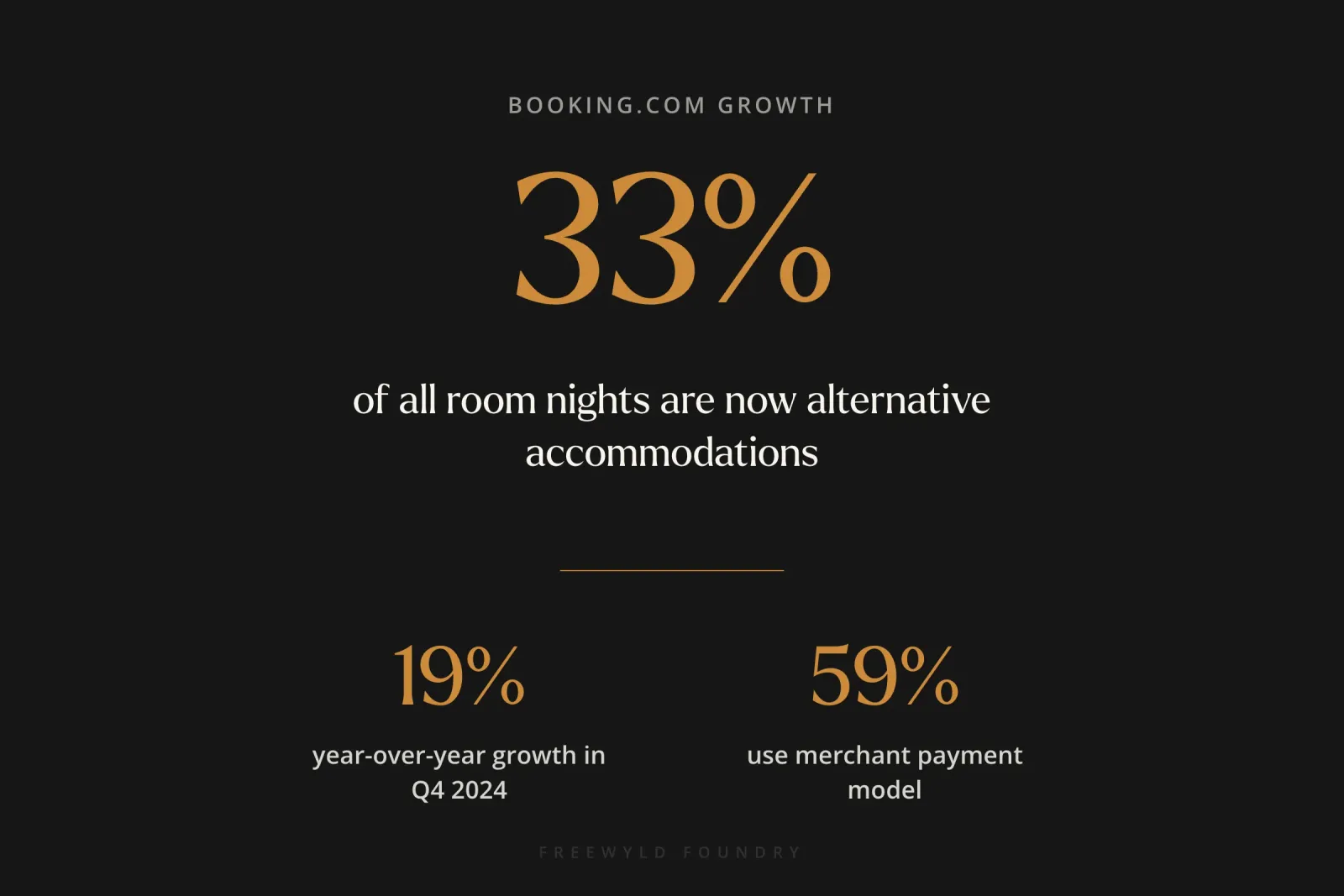
- 59% of bookings now use Booking.com’s merchant payment model (where the platform collects payment and pays hosts later)
Why the platform matters for STR operators:
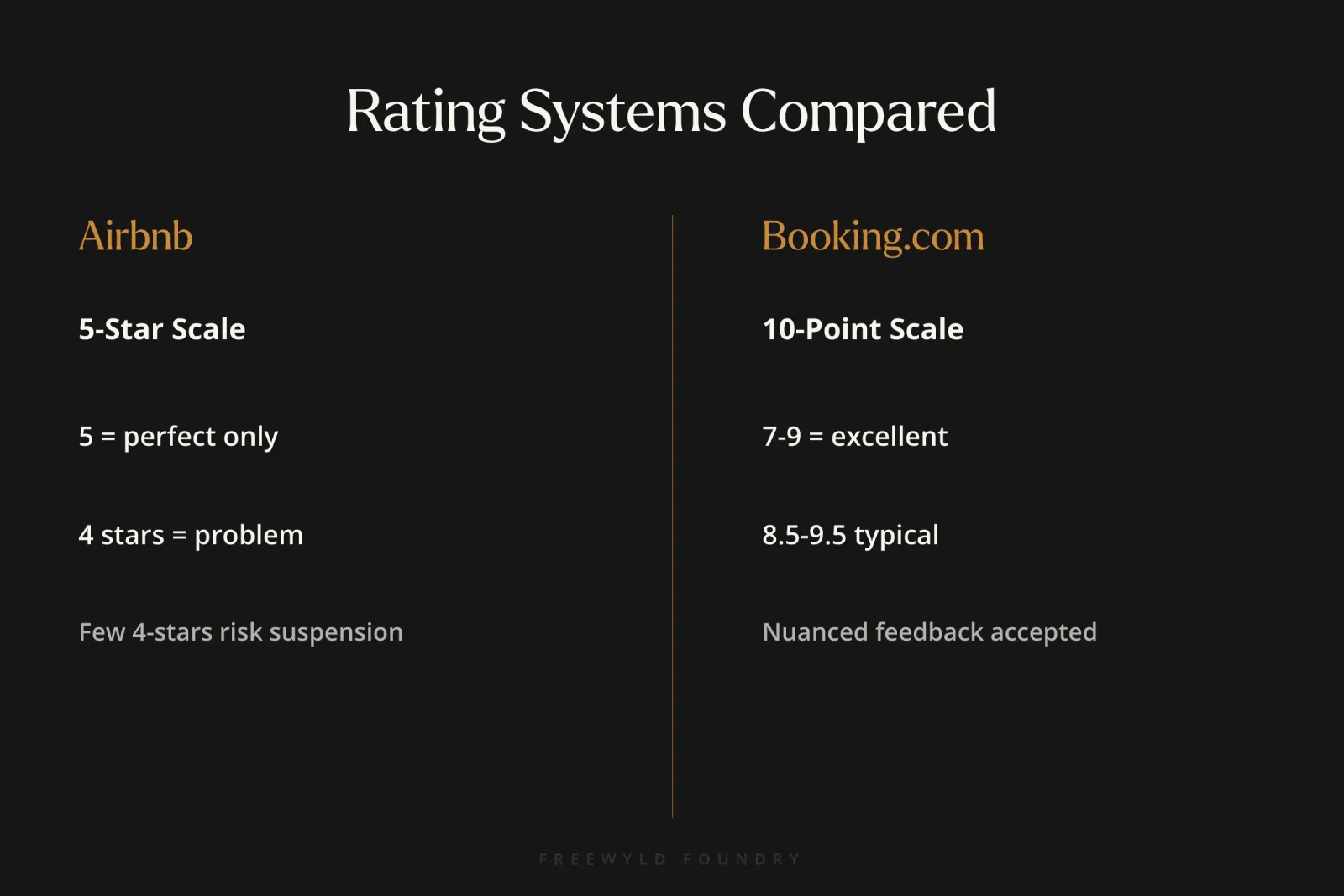
The most compelling reason to add Booking.com for short term rentals to your channel mix is Airbnb’s increasingly punitive review system. Airbnb uses a binary rating system where five stars means perfect and anything less signals problems. Getting just a few four-star reviews can now trigger listing suspension, even if those reviews came from picky guests who had minor complaints about issues outside your control.
Booking.com uses a 1-10 rating scale where guests can give nuanced feedback. A rating of 8 or 9 is considered excellent, not a red flag. This more forgiving system means your revenue isn’t as sensitive to individual negative reviews, providing crucial protection for your business continuity.
According to Jasper Ribbers, co-founder of Freewyld Foundry, “Being just on Airbnb is really not a viable option anymore. Airbnb is removing and suspending listings pretty quickly. Because technically, if you get a couple four-star reviews, your listing might be suspended.”
How Does Booking.com’s Rating System Compare to Airbnb?
Understanding the fundamental difference between Booking.com for short term rentals and Airbnb’s rating systems is critical for operators managing properties across both platforms.
Airbnb’s Binary System:
Airbnb forces guests to choose between “perfect” (five stars) and “problematic” (four stars or less). There’s no middle ground. If your guest had a 95% perfect experience but the WiFi was slow for an hour, they might give four stars because it wasn’t technically perfect. Unfortunately, Airbnb’s algorithm treats that four-star review almost like a one-star review.
The consequences are severe. Get a few four-star reviews, and your listing may appear in the “bottom 10%” category or face suspension entirely. This binary system puts enormous pressure on hosts to deliver absolute perfection on every single stay.
Booking.com’s 1-10 Scale:
Booking.com allows guests to rate properties from 1 to 10, with 10 representing perfection. The crucial difference is that ratings of 7, 8, and 9 are all considered good to excellent. A guest who had a wonderful stay but noticed one minor issue can give you a 9 without signaling to the algorithm that something was wrong.
As Jasper Ribbers explains, “Booking.com doesn’t force their guests to choose between essentially perfect and remove this listing. So I think that’s a big pro for Booking.com.”
Practical Impact:
The best-performing properties on Booking.com typically have ratings between 8.5 and 9.5. Getting a perfect 10.0 is extremely rare because guests naturally use the full scale when given the option. This means your revenue performance won’t crater from a single guest who had high expectations.
For property managers handling multiple listings, this rating system provides crucial business continuity insurance. While you should still strive for excellence, you won’t risk losing your entire Booking.com presence because of a few imperfect experiences.
What Are the Key Differences Between Booking.com and Airbnb?
Beyond rating systems, Booking.com for short term rentals operates differently than Airbnb in several critical ways that affect your revenue strategy.
Rate Plans and Flexibility
Airbnb offers one rate plan per property. You set your nightly rate, add cleaning fees, and apply any length-of-stay discounts. While Airbnb recently added a non-refundable discount option (10% off), that’s the extent of rate plan flexibility.
Booking.com allows multiple rate plans for the same property, similar to how hotels operate. You can create different pricing tiers based on cancellation policies, with each tier priced differently.
Example rate plan structure:
- Non-refundable rate: Your base price (cheapest option)
- 14-day cancellation: Base price plus 10%
- 30-day cancellation: Base price plus 15-20%
This flexibility lets you capture different guest segments. Price-sensitive travelers book the non-refundable option, while guests who want flexibility pay a premium for cancellation protection.
Payment Processing
Historically, Booking.com required hosts to collect payments directly from guests, which created serious chargeback problems. Guests would book, hosts would charge their credit cards, and then guests would dispute the charge and get refunds while still completing their stays.
The platform solved this issue by introducing a merchant payment model where Booking.com collects payment and remits it to hosts later (similar to Airbnb). This model now accounts for 59% of all bookings, eliminating the chargeback problem.
International Audience
Booking.com was founded in the Netherlands and maintains a stronger presence in international markets, particularly Europe. This brings a more globally diverse guest base compared to Airbnb’s North American focus.
If your properties appeal to international travelers, Booking.com often outperforms Airbnb for reaching guests from specific countries. The platform also allows you to create country-specific or even state-specific discount rates to target particular markets.
What Is the Genius Loyalty Program and Why Does It Matter?
The Genius program is Booking.com’s loyalty system and represents the single most important factor for your listing’s performance on the platform. Properties enrolled in Genius see higher booking rates and revenue.
How Genius Works:
Guests earn Genius status by completing bookings on Booking.com. There are three levels:
- Level 1: Achieved after 1-2 bookings
- Level 2: Requires more bookings (exact number varies)
- Level 3: Requires frequent bookings (Jasper Ribbers mentions being Level 3 after using the platform extensively)
Benefits for Guests:
When guests book Genius-eligible properties, they receive:
- Discounts ranging from 10% to 20% depending on their Genius level
- Additional perks like free breakfast, room upgrades, late checkout, or early check-in (property-specific)
- Visible “Genius” badges on listings showing they’re getting a deal
Benefits for Hosts:
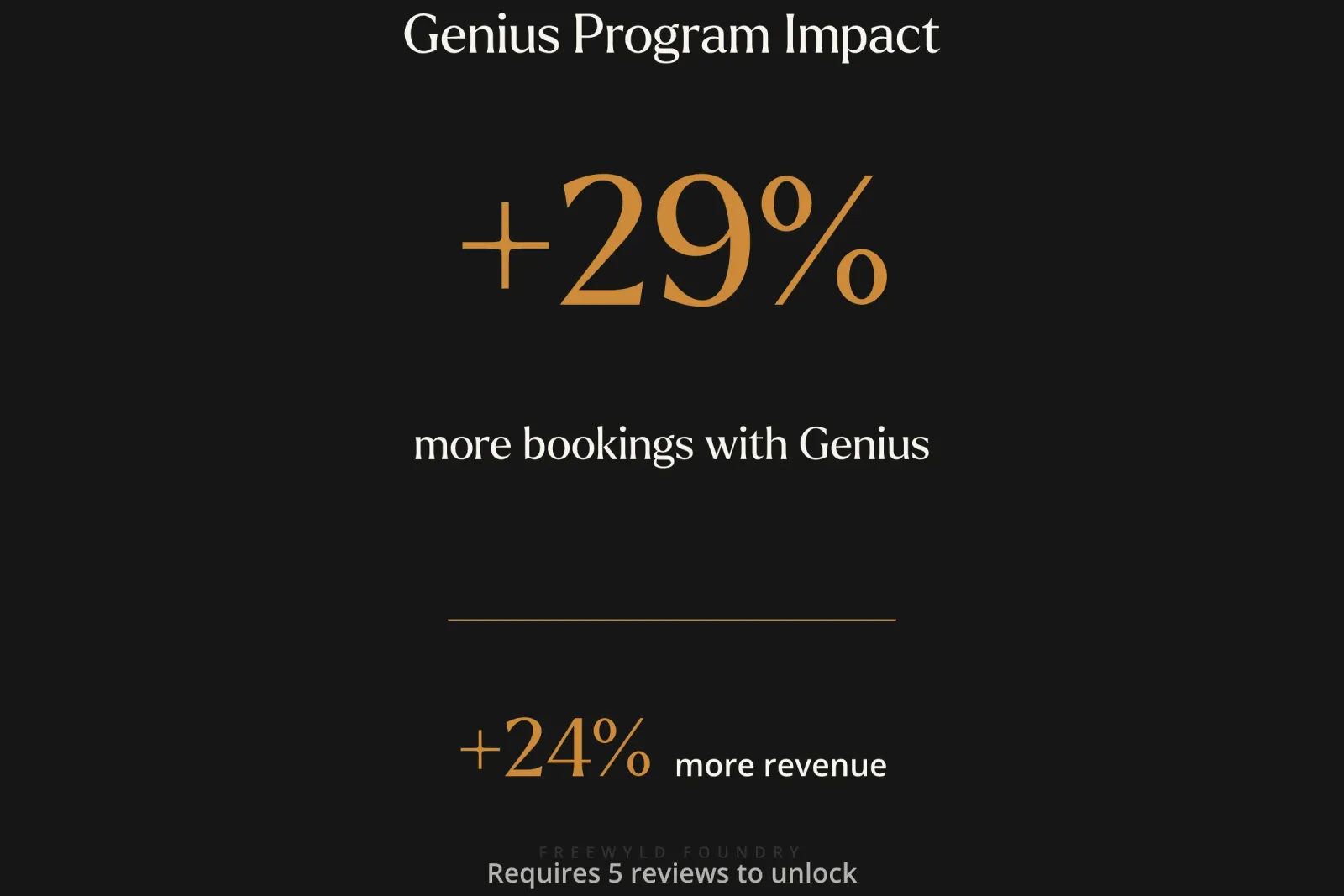
According to platform data, properties using the Genius program generate:
- 29% more bookings compared to non-Genius properties
- 24% more revenue overall
These numbers reflect the psychological power of loyalty programs. Genius members feel like they’re getting special treatment, which drives booking behavior even if the property’s actual price (after discounts) is similar to competitors.
The Critical Requirement:
Your property cannot enroll in Genius until it receives five reviews on Booking.com. This creates a chicken-and-egg problem: you need bookings to get reviews, but you need reviews to access the Genius program that drives most bookings.
“Without five reviews, your property isn’t eligible for Genius, so you will not be able to use the genius discount and that’s going to really hurt performance.”
- Jasper Ribbers, Co-founder at Freewyld Foundry
The Review Challenge:
Booking.com users leave reviews far less frequently than Airbnb users. On Airbnb, nearly every guest leaves a review because it’s built into the platform’s culture and post-stay workflow. On Booking.com, guests must actively choose to return and write a review, often weeks after their stay.
The review window is much longer (3-6 months), which helps, but you’ll likely need to actively request reviews from guests or offer incentives like 10-15% off their next booking in exchange for honest feedback.
What Discounts Should You Offer on Booking.com?
Booking.com for short term rentals is a conversion-driven platform built on creating the perception of value through visible discounts. Properties without discount badges appear incomplete compared to competitors and perform significantly worse.
As Jasper Ribbers explains, “It’s always impossible to book something on Booking.com without getting at least some type of discounts. Booking.com is very good at making the guest feel that they’re getting a deal.”
Mobile-Only Rates
What it is: A 10% discount that appears only when users book through Booking.com’s mobile app.
Why it matters: The mobile discount drives a 28% increase in mobile bookings compared to properties without the discount. Booking.com prioritizes mobile bookings and rewards properties that encourage this behavior.
How to implement: Set up the mobile-only rate discount in your Booking.com dashboard. This should be one of your first discounts when launching on the platform.
Genius Discounts
What it is: Tiered discounts for Genius loyalty members:
- Level 1: Typically 10% off
- Level 2: Typically 15% off
- Level 3: Typically 20% off
Why it matters: As discussed above, Genius drives 29% more bookings and 24% more revenue. The visible Genius badge on your listing signals value and quality to the platform’s most frequent bookers.
How to implement: Enable Genius in your property settings once you have five reviews. Set your discount percentages conservatively at first (10%/15%/20%) and adjust based on performance.
Preferred Partner Program
What it is: An upgraded visibility tier where you pay 18% commission (versus the standard 15%) in exchange for:
- A yellow thumbs-up badge on your listing
- Higher placement in search results
- Increased overall visibility
Why it matters: The commission difference is only 3%, but the visibility boost and trust signal from the thumbs-up badge often more than compensate through increased booking volume.
How to implement: Booking.com will invite you to join the Preferred program. Accept the invitation unless your margins are extremely tight.
Early Bird and Last-Minute Deals
What they are: Time-based discounts for guests booking far in advance or booking shortly before check-in.
Why they matter: These discounts help you capture different guest segments. Early bird deals appeal to planners and fill your calendar early. Last-minute deals help you avoid vacancy on unsold dates.
How to implement: Set these up strategically based on your booking window patterns. If you typically book out far in advance, last-minute deals matter more. If you see consistent last-minute booking activity, early bird deals can help capture committed guests earlier.
How Do You Calculate Channel Markup for Booking.com?
Here’s where Booking.com for short term rentals gets mathematically complicated. With multiple discounts stacking on top of each other, you need to mark up your Booking.com rates to ensure you receive your minimum acceptable revenue per night.
The Stacking Problem:
If you offer both a 10% Genius discount and a 10% mobile discount, a Genius Level 1 member booking on mobile receives both discounts. This compounds to a 19% total discount (not 20%, due to how percentages compound).
For simplicity, operators often treat 10% + 10% as approximately 20% discount when calculating their markup needs.
The Markup Calculation:
If your minimum acceptable rate is $100 per night:
- With a 20% discount, you need to price at $125 to net $100
- $125 minus 20% = $100
If your minimum rate is $100 and you offer 10% Genius + 10% mobile:
- Set your Booking.com base rate at $125
- Genius member on mobile sees $100 (your actual minimum)
- Non-Genius desktop user sees $125 (above your minimum, which is fine)
The Tradeoff Decision:
Many operators choose a middle-ground markup of 15-20% rather than the full 25%. This means:
- Genius members on mobile get a slightly better deal than your stated minimum
- Non-Genius desktop users pay slightly above your other channels
- You balance competitiveness with revenue protection
According to Jasper Ribbers, “It’s basically impossible to have price consistency over channels when you’re using Booking.com and you’re maximizing all the different tools and discounts.”
The Owner Communication Challenge:
If you manage properties for owners, they will notice:
- Bookings coming in below the “minimum” you quoted
- Higher prices showing on Booking.com compared to Airbnb
- Different prices depending on who’s looking and how
Set expectations early that Booking.com’s discount model creates intentional price variability. Show them the performance data (29% more bookings, 24% more revenue with Genius) to justify the approach.
What Are Common Mistakes to Avoid on Booking.com?
Mistake 1: Not Offering Any Discounts
Why it’s wrong: Properties without visible discount badges look incomplete and untrustworthy compared to competitors. Users’ eyes are trained to look for Genius badges, mobile discounts, and other value signals. Without them, your listing appears like something is missing or wrong.
As Jasper Ribbers puts it, “My brain automatically thinks okay that property there’s something wrong with it. It doesn’t have any of the stuff that all the other properties have.”
What to do instead: At minimum, offer Genius discounts (once eligible) and mobile-only rates. Consider the Preferred program for the yellow thumbs-up badge.
Mistake 2: Marking Up Too Early
Why it’s wrong: When you first list properties on Booking.com for short term rentals, your goal is generating those critical first five reviews that unlock Genius eligibility. If you immediately apply a 20-25% markup to compensate for future discounts, your prices will be uncompetitive and you won’t generate the booking velocity needed for reviews.
What to do instead: Launch with competitive pricing (no markup) and strategic discounts (mobile-only rate). Focus purely on getting to five reviews as quickly as possible. Once Genius-eligible, then implement your markup strategy.
Mistake 3: Ignoring Property Page Score
Why it’s wrong: Booking.com provides direct feedback through a Property Page Score (0-100%) that tells you exactly what your listing needs for maximum visibility. Operators who ignore this score miss easy optimization wins.
What to do instead: Go to your property settings and check your Property Page Score. Booking.com will show you a specific breakdown of what’s missing (more photos, better descriptions, amenity tags, etc.). Work systematically to reach 100%.
Mistake 4: Not Actively Requesting Reviews
Why it’s wrong: Booking.com users don’t automatically leave reviews like Airbnb users do. If you wait passively for reviews to come in, you might wait months or longer to get the five reviews needed for Genius eligibility.
What to do instead: Proactively message past guests (you have 3-6 months to request reviews) and offer incentives like 10-15% off their next booking in exchange for honest feedback. Make getting to five reviews a top priority.
Mistake 5: Using Identical Descriptions Across Platforms
Why it’s wrong: Booking.com users have different expectations and behaviors than Airbnb users. They’re often international travelers, more accustomed to hotel-style amenities, and comparing your listing to hotels.
What to do instead: Tailor your Booking.com descriptions to emphasize hotel-like amenities (24/7 support, keyless entry, professional cleaning), highlight proximity to business districts or tourist attractions, and use more formal language than you might on Airbnb.
How to Implement a Booking.com Strategy: Step-by-Step
Step 1: Sign Up and Complete Onboarding (Allow 1-2 Months)
Don’t rush the Booking.com setup process. The platform has more requirements than Airbnb, and trying to shortcut the process creates problems later.
Complete all verification steps:
- Business documentation
- Property photos (high-quality, hotel-style if possible)
- Detailed amenity lists
- Accurate location data
Set up payment processing:
- Opt into the merchant payment model (where Booking.com collects payment)
- Provide bank account details for remittance
- Review payment schedules and terms
Step 2: Optimize Your Property Page to 100% Score
Go to your property settings and check your Property Page Score. Work through Booking.com’s specific recommendations to reach 100%.
Common requirements:
- Minimum number of photos (often 15-20+)
- Complete amenity tagging
- Detailed property description
- House rules stated
- Check-in/check-out processes explained
Step 3: Add Mobile-Only Discount (10%)
Enable the mobile discount in your rate settings. Set it at 10% to start.
Critical: Do not add channel markup yet. Your goal is generating bookings to earn reviews, so keep your pricing competitive with other channels.
Step 4: Create Multiple Rate Plans
Set up at least two rate plans based on cancellation policy:
- Non-refundable rate: Your base price
- Flexible rate (14-day or 30-day cancellation): Base price + 10-15%
This gives guests options and helps you capture different booking behaviors.
Step 5: Push Hard for First 5 Reviews
Proactive review requests:
- Email past guests within the 3-6 month review window
- Offer incentives (10-15% off next booking) for honest feedback
- Keep messages short and personal
- Include direct link to review page
During stays:
- Provide exceptional service to earn organic five-star reviews
- Follow up during the stay to address any issues before they become review problems
- Send a thank-you message after checkout mentioning you’d appreciate a review
Step 6: Enable Genius Once Eligible
As soon as you receive your fifth review, activate the Genius program.
Recommended starting discounts:
- Level 1: 10%
- Level 2: 15%
- Level 3: 20%
You can adjust these percentages based on performance, but these represent a good starting point that balances competitiveness with revenue protection.
Step 7: Apply Strategic Channel Markup (20-25%)
Now that Genius is active, implement your channel markup to compensate for the discounts.
Calculate your markup:
- If offering 10% Genius + 10% mobile = ~20% total discount
- Apply 20-25% markup to reach your true minimum rates
- Example: $100 minimum × 1.25 = $125 Booking.com base rate
Monitor the results:
- Compare actual booking rates to Airbnb and direct
- Check both mobile and desktop views
- Verify Genius members are seeing rates at or near your minimum
Step 8: Enroll in Preferred Program
Accept Booking.com’s invitation to the Preferred program (if offered). The 3% commission increase (15% to 18%) is typically worth the visibility boost and yellow thumbs-up badge.
Step 9: Test Your Pricing Across User Types
Do trial bookings to verify rates:
- Book as a Genius member on mobile (should show maximum discount)
- Book as non-Genius on desktop (should show higher rate)
- Compare final rates to Airbnb and direct channels
- Adjust markup if necessary
Step 10: Set Owner Expectations
If managing for owners, communicate the Booking.com strategy before they see discrepancies:
- Explain why some bookings appear below minimum
- Show them the Genius performance data (29% more bookings)
- Walk them through the Property Page Score dashboard
- Provide context on rate variability by user type
What Results Can You Expect from Booking.com?
Performance varies significantly based on:
- Your property type and location
- How well you execute the discount strategy
- Your Property Page Score optimization
- How quickly you reach Genius eligibility
- Competition in your market
Typical performance indicators for well-optimized properties:
| Metric | Impact | Source |
|---|---|---|
| Booking increase with Genius | +29% | Booking.com platform data |
| Revenue increase with Genius | +24% | Booking.com platform data |
| Mobile booking increase | +28% | Booking.com platform data |
| Commission (standard) | 15% | Standard rate |
| Commission (Preferred) | 18% | Preferred program |
| Typical guest rating | 8.5-9.5 | Well-performing properties |
| Review frequency | Lower than Airbnb | Requires proactive outreach |
Revenue timeline expectations:
- Month 1-2: Slow start while generating first reviews, 5-10% of Airbnb revenue
- Month 3-4: Reaching Genius eligibility, revenue accelerates to 15-25% of Airbnb
- Month 5-6: Full optimization complete, can reach 30-40% of Airbnb revenue in strong markets
- Year 1+: Mature channel, often 25-35% of total channel mix depending on market
Market-specific performance:
Booking.com for short term rentals performs particularly well in:
- Major metro areas with international tourism
- Business travel destinations
- European markets and beach destinations
- Markets with high hotel density (users comparing STRs to hotels)
Performance is often weaker in:
- Rural areas with limited tourism infrastructure
- Domestic-focused destinations (Airbnb dominates)
- Markets where Booking.com has minimal brand presence
Frequently Asked Questions
How long does it take to get approved on Booking.com for short term rentals?
The onboarding process typically takes 1-2 weeks from initial signup to going live, assuming you have all documentation ready. However, allow 1-2 months to fully optimize your listings, generate your first reviews, and reach Genius eligibility. Unlike Airbnb’s quick setup, Booking.com for short term rentals requires patience and systematic work to reach full performance.
Do I need to offer the same prices on Booking.com as Airbnb?
No. In fact, maintaining exact price parity is nearly impossible with Booking.com’s discount structure. Most operators price Booking.com 20-25% higher than other channels to account for Genius and mobile discounts. The final price guests see will vary based on their Genius level and whether they’re booking on mobile, so some bookings will match Airbnb pricing while others will be higher.
What happens if I don’t reach Genius eligibility on Booking.com for short term rentals?
Properties without Genius eligibility see significantly reduced performance, typically 29% fewer bookings according to platform data. Without the Genius badge, your listing appears less trustworthy and less valuable than competitors. Focus intensely on getting those first five reviews through proactive outreach and incentives to unlock this critical program.
Should I use the same photos on Booking.com and Airbnb?
You can use the same photos, but consider that Booking.com users often compare your property to hotels. Professional, hotel-style photography with bright, clean shots of amenities tends to perform better than the lifestyle photography that works well on Airbnb. At minimum, ensure you meet Booking.com’s photo requirements for 100% Property Page Score.
How much should I discount for non-refundable rates on Booking.com?
Most operators price non-refundable rates at their base price, then add 10-15% for moderate flexibility and 15-20% for maximum flexibility. The discount percentage depends on your booking patterns and how much value you place on upfront commitment from guests. Test different percentages and monitor which rate plans convert best in your market.
Can Booking.com for short term rentals replace Airbnb as my primary channel?
While Booking.com can generate significant revenue (25-35% of total bookings in mature markets), it typically works best as a complementary channel rather than a complete Airbnb replacement. Most successful operators use both platforms to maximize occupancy, with dynamic pricing strategies that account for each channel’s unique characteristics and commission structures.
How does Booking.com handle guest disputes compared to Airbnb?
Booking.com generally takes a more hands-off approach to guest-host disputes compared to Airbnb. With the merchant payment model now handling 59% of bookings, payment disputes are less common. However, the platform provides less automatic protection than Airbnb’s Host Guarantee program, so operators should maintain their own insurance and security deposit policies for comprehensive protection.
What metrics should I track to measure Booking.com for short term rentals performance?
Focus on these key metrics: conversion rate (views to bookings), average booking window, revenue per available room (RevPAR), commission costs as percentage of revenue, and review velocity. Compare these against your STR KPI benchmarks from other channels to identify optimization opportunities specific to Booking.com’s audience and booking patterns.
Conclusion
Booking.com for short term rentals has evolved from a hotel-only platform into an essential channel for serious short-term rental operators. With alternative accommodations representing 33% of the platform’s room nights and growing at 19% annually, the platform offers crucial diversification from Airbnb’s increasingly punitive review system.
The key to Booking.com success is understanding and embracing the platform’s complexity. Properties that master the discount structure, reach Genius eligibility quickly, optimize their Property Page Scores, and apply strategic channel markups see dramatic performance improvements: 29% more bookings and 24% more revenue through Genius alone.
Start by setting up mobile-only discounts and focusing intensely on earning your first five reviews. Don’t worry about price optimization or complex rate plans initially. Once you reach Genius eligibility, implement your full discount and markup strategy. Accept that price consistency across channels is impossible and communicate this reality to owners early.
The onboarding process takes longer than Airbnb, and the platform requires ongoing management and optimization. But for operators managing $1M+ in annual revenue across 10+ listings, Booking.com for short term rentals provides essential revenue diversification and protection from Airbnb’s binary review system.
Want expert help maximizing your Booking.com performance?
Get a free revenue report analyzing your current pricing strategy across all channels, including specific recommendations for Booking.com optimization. Get your free revenue report
Related Resources:
- STR Revenue Management Guide: Maximize Your Performance
- Dynamic Pricing Airbnb: How It Works and Tools Compared
- How to Track STR KPIs: From Guessing to Data-Driven
Listen to the full conversation:
Get Paid for Your Pad Podcast, Episode 712
About Jasper Ribbers:
Jasper Ribbers is co-founder of Freewyld Foundry, a revenue and pricing management company managing over $170M in annual bookings across 3,500+ short-term rental listings. He co-hosts the Get Paid for Your Pad podcast and specializes in helping STR operators with $1M+ in annual revenue optimize their pricing strategies and channel distribution.